
TL;DR
- The e-MJV is the system in which industrial sites in the Netherlands submit their annual environmental report (the Integrated PRTR report).
- You report if your activity falls under the PRTR Regulation, you are above the capacity threshold and you exceed a reporting threshold. For waste that is more than 2 tonnes of hazardous or more than 2,000 tonnes of non-hazardous waste per year.
- The report must be published by 31 March at the latest. The competent authority assesses it before 1 July and almost always asks questions.
- The waste section takes the most time: for each waste stream you state the EURAL code, quantity, treatment method, R or D code and determination method, with no import function.
In early January the e-MJV opens again. For hundreds of industrial sites in the Netherlands, that is the start of the annual environmental report on the past year. For many HSE teams it raises the same questions every year. Who has to report? What exactly is being asked? And how do you make sure the figures are right when the competent authority assesses them?
In this blog we explain the e-MJV from start to finish. We begin with the basics, go through submission step by step and then look more closely at the waste section, which in practice takes the most time.
What is the e-MJV?
e-MJV stands for elektronisch milieujaarverslag, the Dutch electronic annual environmental report. It is the system in which you submit your annual environmental report. It applies to sites located in the Netherlands.
When people talk about "the e-MJV", they usually mean the Integrated PRTR report (Integraal PRTR-verslag). That is the report you submit in the e-MJV. In it you report on the past calendar year:
- the emissions of substances to air, water and soil;
- the waste your site has transferred off-site (the waste module);
- where applicable your energy and water use, and sometimes odour and noise if your permit requires it.
It helps to be clear about one distinction. The e-MJV is the system. The obligation to report comes from the legislation: the European PRTR Regulation, implemented in the Netherlands in, among others, the Environmental Activities Decree (Besluit activiteiten leefomgeving, Bal) under the Environment and Planning Act (Omgevingswet).
The same system is also used for other reports, such as those on substances of very high concern (ZZS) and on oil and gas extraction. So not every user of the e-MJV has the same obligations. Your own sustainability report or annual report does not replace the submission in the e-MJV.
What happens to your data? After approval by the competent authority, it goes to the Dutch Ministry of Infrastructure and Water Management and to the European Commission. Part of it is made public through the national PRTR. Your figures are therefore not only visible to the government.
Who does the e-MJV apply to?
Whether you have to report depends on your site, not on your company as a whole. You assess this in three steps.
1. Do you carry out an activity covered by the scheme? Annex I of the PRTR Regulation lists 65 industrial activities across nine sectors. Examples are energy generation, refineries, the production and processing of metals, cement, glass and ceramics, the chemical industry, waste treatment and waste water treatment, paper and wood, intensive livestock farming and the food and drink industry.
2. Are you above the capacity threshold? Many activities come with a threshold. A combustion plant, for example, is only covered above 50 MW, a poultry farm from 40,000 places. Some activities have no threshold. In that case the scheme always applies.
3. Do you exceed a reporting threshold? Each substance has an emission threshold. For waste there are two: more than 2 tonnes of hazardous waste per year, or more than 2,000 tonnes of non-hazardous waste per year. If you exceed either threshold, you are required to report.
Note: the waste thresholds alone do not make you subject to reporting. The activity and the capacity must also meet the criteria. An office that produces a lot of waste is therefore not covered.
You have to do the work to know whether reporting is required
A striking feature of the e-MJV is that you only know whether you exceed the waste threshold once everything that left the site during the year has been added up. In effect you have to do the work to find out whether you need to report.
That is why sites covered by the scheme are obliged to keep records, even if they end up below the thresholds. Throughout the year you record what you transfer and emit, in a documented measurement and registration system. Without those records you cannot show that reporting was not required. So if you do not have to submit a report, you are still obliged to keep records.
The e-MJV year at a glance
The e-MJV follows the same rhythm every year.
- All year round: you record your emissions and your waste transfers.
- December: companies and competent authorities receive an email about the start of the new reporting year.
- January: the new reporting year is open in the application. You set a new password.
- Before 1 February: apply for a group account (concernaccount) in good time if you enter data for several sites. After that date the helpdesk no longer guarantees the processing time of five working days.
- Before 1 April: your report must be finally submitted. In practice 31 March is treated as the deadline.
- Before 1 July: the competent authority has assessed your report. An extension is possible until 30 September at the latest.
- 1 October: the e-MJV closes until the new release in January. Everything concerning the past reporting year must be completed by then.
- A year later: the data is made public through the national PRTR.
How do you submit the e-MJV? Step by step
The e-MJV application is in Dutch. We give the Dutch names of the screens and statuses so you can find them.
Step 1: Make sure you have access
New participants request an account from the e-MJV helpdesk. Existing participants log in with their email address. You set a new password every year, because the old one expires.
Each organisation has one main user. That person creates accounts for colleagues under Accountbeheer (account management) and can remove them again. Arrange this in good time, especially if last year's main user has since left the company.
Are you responsible for several sites? Then you can apply for a group account. You get a single login for all your sites. You apply using a form that you email to the helpdesk.
Step 2: Check the general details
In the Algemene gegevens (general details) module, check whether your company details are correct. Pay particular attention to the competent authority linked to your site. Usually that is the province, or the body that also decides on your environmental permit. If the wrong body is listed here, your report ends up with the wrong party.
Step 3: Complete the modules
On the Index tab you can see which modules are open to you, with the status "Gereed voor invoer" (ready for input). There are usually several: emissions to air, water and soil, waste, and where required energy and water.
For each figure, state how you determined it: measured, calculated or estimated. Add attachments where needed to substantiate your figures. If you are below the threshold for a section, you tick that in the module.
Step 4: Check your input
Use the Controle (check) tab. It shows a summary and any error messages. Also compare your figures with last year's yourself. You have to be able to explain large differences, because the competent authority will certainly ask about them.
Step 5: Finalise and publish
Set the status to "Definitief ingevoerd" (finally entered) and publish the report on the Publiceren (publish) tab. The system then automatically creates an email for your competent authority. Do not forget to send it. Do this by 31 March at the latest.
Step 6: Deal with the assessment
The competent authority assesses your report for completeness, consistency and accuracy. There are three possible outcomes:
- Accepted: the report is complete.
- Additional information requested: you adjust the data and publish again.
- Not accepted: the report does not meet the requirements and was not corrected in time. That can lead to enforcement.
Do you want to change something after acceptance, for example because you discover an error? Then you use the amendment form (mutatieformulier).
The waste section in detail
The PRTR report consists of several modules, and the waste section is one of them. You complete the waste module if your site exceeds one of the waste thresholds. In practice it is also the part that takes the most time. That is because the data comes from many different sources: invoices, weighbridge tickets, waste transport notes (begeleidingsbrieven) and the statements of various waste collectors.
What counts?
If you exceed either of the two waste thresholds, you report all your waste: both the hazardous and the non-hazardous part.
Everything that leaves your site counts. That includes waste from third parties that is removed via your site, and waste that subcontractors produce and remove on your site. The latter is often forgotten.
Waste that you treat on your own site only counts if you use it as fuel, incinerate it or landfill it. You do not have to report other on-site treatment.
What do you enter per waste stream?
For each waste stream you state:
- The EURAL code. This is the Dutch version of the European List of Waste. An asterisk in the code means it is hazardous waste.
- The quantity, in tonnes per year.
- The treatment method. You choose from reuse or recovery, use as fuel, incineration, landfill or discharge, and a waste sorting facility. For some of these you also state whether it takes place on-site or off-site.
- The R or D code. R1 to R13 stand for recovery, D1 to D15 for disposal.
- The determination method. Measured (M), calculated (C) or estimated (E). For measured and calculated you also state which method you used. Measuring is preferred over calculating, and calculating over estimating.
- For sludge: the percentage of dry matter.
If you export hazardous waste abroad yourself, you also state for each recipient the name and address of the processor, and the address of the location where the waste is actually treated. The total must match what you entered as export in the main table.
The waste module has no import function. You enter everything by hand, line by line. You can attach a spreadsheet as supporting evidence for the competent authority.
For a detailed explanation of each field, read EURAL codes, R and D codes and M/C/E: how to complete the waste module.
The difference with the LMA notification
Many companies wonder why they have to report waste in the e-MJV when it is already known to the LMA (Landelijk Meldpunt Afvalstoffen), the Dutch national waste register. The difference lies in who reports. In the e-MJV, the waste producer reports: the company the waste comes from. To the LMA, the recipient reports: the processor. Formally, therefore, it is not a duplicate notification.
The competent authority does compare the two. If the figures do not match, you get questions. That happens more often than many companies expect. In practice we see differences of 10 to 60% between the LMA data and a company's actual waste streams. So you cannot simply copy the LMA data, and as the reporting company you have to be able to explain the differences. geoFluxus also has access to the LMA data and compares it with your source data in advance. That way you see the differences before the competent authority does.
Read more in Why your LMA data does not match your own waste data.
What the competent authority looks at
When assessing the waste module, the competent authority checks, among other things, whether:
- all waste streams have been reported per EURAL code and per treatment method;
- both hazardous and non-hazardous waste are included;
- on-site treatment has been completed, or it is explicitly stated that it does not apply;
- the quantities are in tonnes per year;
- the determination method has been entered for each stream;
- for exports of hazardous waste, the processor's details are correct;
- the figures are plausible.
That last point is where most questions come from. The competent authority compares your figures with last year's and with the LMA data. Differences of more than 10% per EURAL code often lead to a request for an explanation. A new waste collector, a renovation or a change in production can be a good explanation, provided you have looked into it beforehand.
With geoFluxus you only supply your invoices, weighbridge tickets and waste transport notes. We map all waste streams per site: from which collector, with which EURAL code, to which treatment. Every figure can be traced back to the document it comes from. If questions come, the answer is already there.
To see how the assessment continues, read What happens after you submit your e-MJV?
What happens when it goes wrong
The e-MJV looks like a formality, until it goes wrong. A report that is late, incorrect or cannot be substantiated can cause a company serious problems.
Penalty payments. If you are late, the competent authority can immediately impose an order subject to a penalty payment (last onder dwangsom). The same applies if your report does not meet the requirements. If you do not put it right in time, the penalty becomes due.
Your name in a public register. If your report still does not meet the requirements after the assessment, the competent authority can issue a negative declaration. This is recorded in the national PRTR, and that register is public. Anyone can then see that your site did not meet the reporting obligation.
Criminal law. Incorrect reporting is an economic offence under Dutch law. Deliberately incorrect figures are in principle prosecuted by the Public Prosecution Service. At that point it is no longer about a form, but about a criminal case.
Local residents and the media are watching. Your figures become public, and they are actually read. In December 2025, Greenpeace and a residents' foundation filed a criminal complaint against a major steel producer because, in their view, it had reported emissions that were too low for years. No decision has been taken on that complaint yet, but the case has already made the news.
There are always questions. We hear from the regional environmental service (omgevingsdienst) that every report is followed up with questions. So your figures have to be in order, and every figure has to be substantiated. If you then have to search through separate spreadsheets, you spend weeks on a report that had already been submitted.
The measurement and registration system
Every site covered by the scheme must have a measurement and registration system. That sounds bigger than it is. It is the documented way of working with which you collect and determine your figures: which data, from which source, in what way and how often.
No software is prescribed. A spreadsheet is allowed, but you must be able to show how you arrive at each figure: from which source and with which calculation. In practice that is difficult with a spreadsheet. Files are copied, formulas are changed and sources get lost. At geoFluxus that way of working is already set up. Every figure is linked to the document it comes from, so the evidence is fixed. And because all your waste streams per site are in one overview, you can also see where you can save or separate better.
The guidance document Leidraad Milieujaarrapportages on the e-MJV website (in Dutch) helps with this. It includes an example of such a system and a checklist that the competent authority itself uses.
You keep the evidence for your figures for five years. Think of invoices, weighbridge tickets, waste transport notes, calculations and the description of your way of working.
Practical tips
Do not wait until March. Entering the data is not what takes the most time; collecting and checking it is. If you start in January, you have room to look into differences before the competent authority asks about them.
Do not rely blindly on your waste collector's statement. Your collector's annual statement is a good source, but it is not automatically complete or correctly classified. Responsibility for the report stays with you. Check whether all streams are included and whether the EURAL code and the treatment are correct.
Prepare an overview before you start entering. Make an overview with, for each line, the EURAL code, the treatment method, the R or D code, the quantity and the determination method. Make sure the totals are correct before you enter them. Attach the same overview to your report. That speeds up the assessment.
Compare with last year and with the LMA yourself. Look into the differences before you submit. Record the explanation and attach it. That way you avoid a round of questions.
Do not forget the subcontractors. Waste that contractors produce and remove on your site counts. Request that data in good time.
Document your way of working. Describe how you determine your figures and where the data comes from. Then the process does not depend on one colleague, and someone else can take over next year.
Arrange your accounts in good time. In December, check who the main user is and whether colleagues still have access. If you have several sites, apply for a group account before 1 February. Read more in The e-MJV with multiple sites.
Common mistakes
- Confusing recovery with recycling. Incineration as fuel (R1) also counts as recovery. If you use the same figures for your circularity targets, keep that distinction sharp.
- Reporting only the hazardous waste. If you exceed one of the thresholds, you report both categories.
- Forgetting on-site treatment. If you incinerate or landfill waste yourself or use it as fuel, that belongs in the report.
- Wrong units. Quantities are in tonnes per year, not in kilograms or cubic metres.
- Not stating a determination method. Every stream needs measured, calculated or estimated.
- Not matching the LMA. Large differences without an explanation almost always lead to questions.
How geoFluxus makes the e-MJV easier
Doing the waste section of the e-MJV yourself takes at least 70 hours per site per year, often topped up with a hired consultant who checks everything. geoFluxus takes over that work. We focus only on the waste section. The other modules, such as emissions, stay with your own team.
Fewer hours, no external check needed. Your team spends far less time on the e-MJV. And because we already check the data, no external consultant has to look at it any more.
Know right away whether you have to report. You only know whether you are above the waste threshold once all the figures are lined up. We do that work. You know right away whether you have to report, and if you do, the report is already waiting.
Insight into all your waste streams. For each site you see which waste streams you have and where they go. That way you get more out of an obligation: where can you save, what could be separated better?
Ready for the new rules. New European rules for this report apply from 2027. With geoFluxus you are already prepared.
How it works
- Supply your documents. You upload or email invoices, weighbridge tickets and waste transport notes, or we connect directly to your ERP system or your waste collectors. All sites and all collectors in one place.
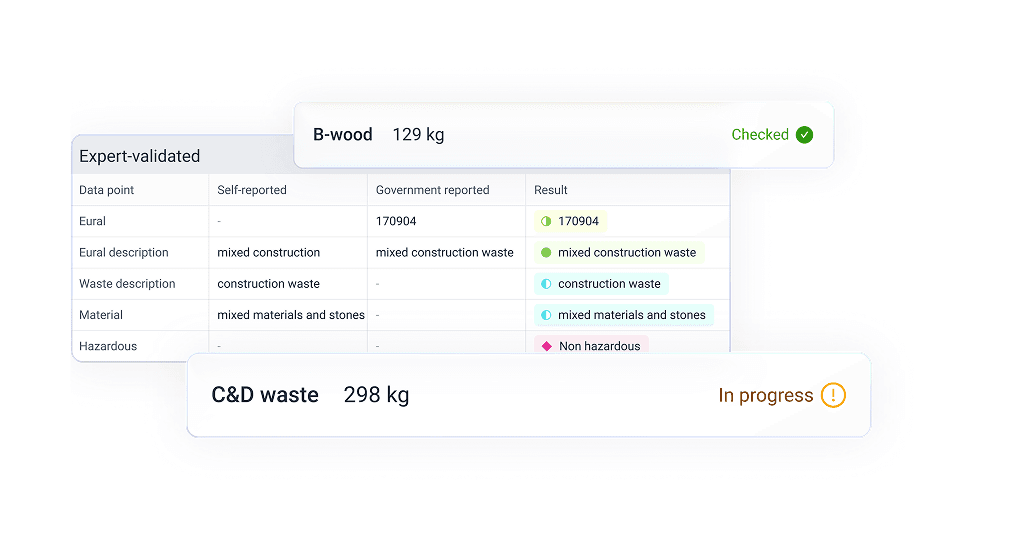
- Classify and enrich. Our algorithms link each stream to the correct EURAL code, treatment method and R or D code, and fill in missing data. Waste experts validate every data point.
- Check. We compare your source data with the LMA data and with last year's figures, and trace duplicates and missing data. The LMA data is not always correct, and as the reporting company you have to explain the differences. We make them visible in advance, so you can explain them before the competent authority asks.
- Delivery of the report. For each site you receive the waste report in exactly the format of the waste module, including the supporting evidence. You can attach it to your e-MJV.
- Submit. Your team copies the figures into the e-MJV and publishes the report. Because the figures are correct and the evidence is ready, the work is limited to copying the figures.
You can also use the same data for other reports, such as ISO 14001, CSRD (ESRS E5) and Scope 3.
What changes from 2027?
Nothing changes for the report on 2026, but after that it does. From reporting year 2027, to be reported for the first time in 2028, the new European regulation on the Industrial Emissions Portal (IEP) replaces the current PRTR Regulation.
What exactly that means for the modules in the e-MJV is not yet known. Do take into account that something will change in what you report and how. If you are setting up your waste records now, look beyond the current format. Record your waste streams in such a way that you can find them per site, per stream and per processor. Then you will not have to start again later.
In conclusion
The e-MJV comes back every year, and the waste section takes the most time. If you keep careful records all year, start on time and look into the differences beforehand, you will have few surprises in March.
Would you rather not work out the waste module yourself every year? geoFluxus delivers your waste report in the format of the e-MJV, including the supporting evidence. Read how it works.
Related Content